
Salesforce to Dynamics 365 Data Migration
Consolidating on the Microsoft stack? Mine automates the mapping between Salesforce's object model and Dynamics 365's Dataverse entity framework — preserving relationships, custom fields, and business logic.
Working with enterprise teams on active migration programs
3–6 weeks
to production-ready mappings
40–50%
cost reduction vs. manual migration
90%+
average mapping confidence
Most enterprise migrations start 6+ months behind schedule. Yours doesn't have to.
This guide is for VPs of IT, data architects, and migration leads at companies moving data from Salesforce to Microsoft Dynamics 365 — whether you're scoping, planning, or mid-program.
Salesforce and Microsoft Dynamics 365 use fundamentally different data architectures. Mine bridges this structural gap automatically — handling schema profiling, field mapping, data transformation, and validation that typically consumes months of manual effort.
Based on enterprise migration programs led by Mine's founding team
Last updated March 2026
How Mine automates your Salesforce to Microsoft Dynamics 365 migration
Mine auto-maps Salesforce objects to Dataverse entities with field-level precision — detecting type mismatches (Text vs. Single Line, Number vs. Whole Number vs. Decimal) and proposing the correct D365 field type for each.
Picklist-to-option-set mapping is generated automatically, including dependent picklist analysis and record-type-specific value filtering — flagged where D365 business rules are needed to replicate the behavior.
Salesforce custom objects are profiled and mapped to Dataverse custom entities with relationship types (1:N, N:N) translated to D365's lookup and intersection entity patterns.
Mine catalogs every Salesforce field referenced by Apex triggers and flows, generating a dependency report so your D365 team knows exactly which Power Automate flows and plugins to build.
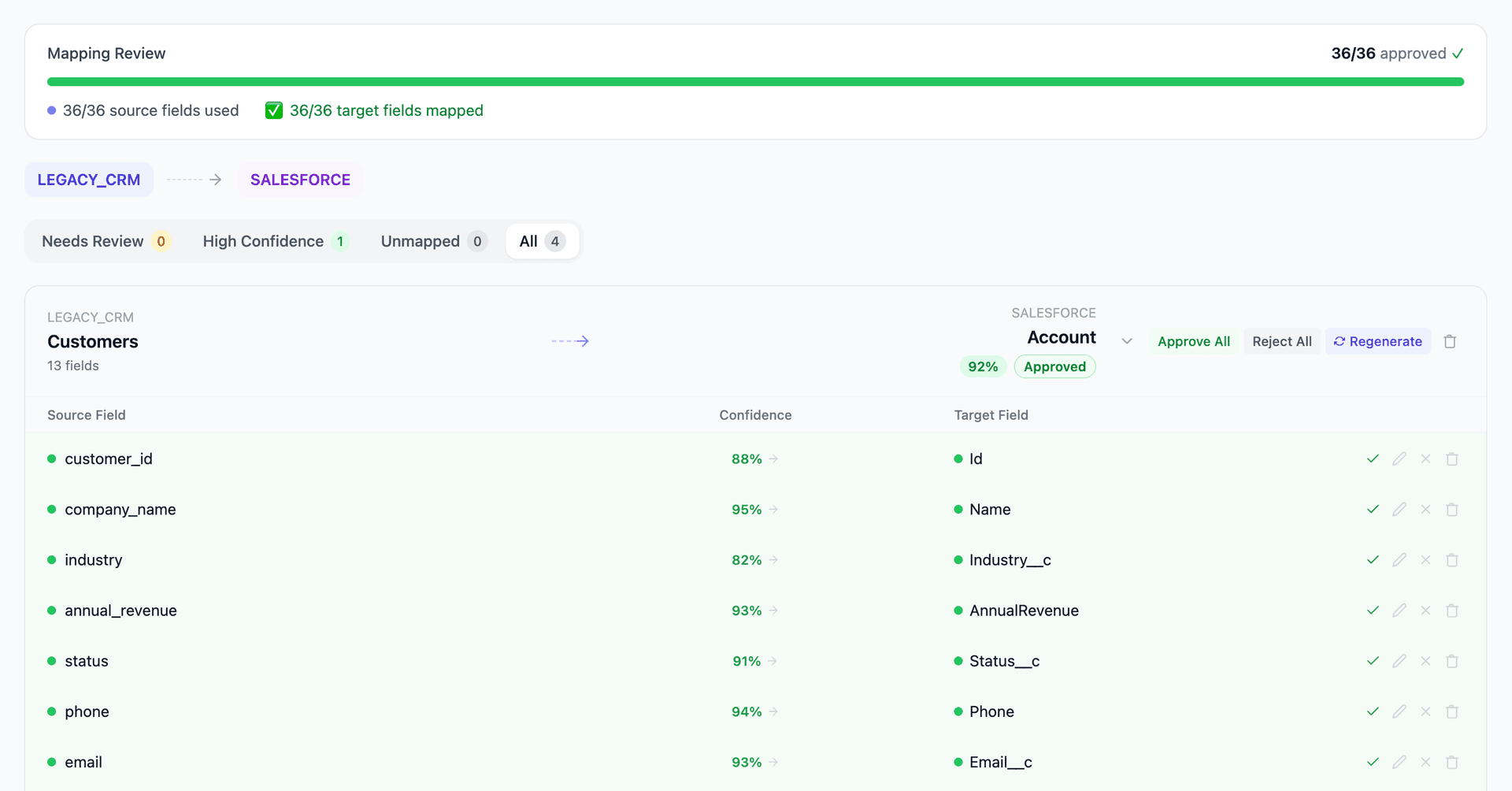
Get your Salesforce to Microsoft Dynamics 365 mapping analysis — see results in under an hour
Migration timeline: manual vs. Mine
Traditional approach
Timeline
4–8 months
Estimated cost
$200K–800K
Team size
3–6 consultants
Typically requires
×Manual field mapping in spreadsheets
×Custom ABAP/SQL extraction scripts
×3–5 mock migration cycles
×Dedicated source system consultants
×Manual reconciliation testing
With Mine
Enterprise benchmarksTimeline
3–6 weeks
Team size
1–2 internal resources
Estimated cost
40–50% less
Included
✓Schema profiling & analysis
✓AI-generated field mappings
✓Transformation SQL
✓Validation & readiness reports
✓Production-ready load files
Common challenges migrating from Salesforce to Microsoft Dynamics 365
Salesforce objects to Dataverse entities
Salesforce standard and custom objects must map to Dataverse standard and custom entities. While conceptually similar (Account→Account, Contact→Contact), the field-level differences are significant — Salesforce Text(255) fields may need Dataverse Single Line of Text or Multiline, lookup relationships use different referencing patterns, and polymorphic fields like WhoId/WhatId have no direct Dataverse equivalent.
Explore related migrations →Picklist and option set alignment
Salesforce picklists (including dependent picklists and record-type-specific picklist values) must map to Dynamics 365 option sets (global and local). The value-label structure is similar but the dependency model differs — Salesforce's record type-based picklist filtering has no exact Dynamics equivalent and may require business rules or form scripting.
Explore related migrations →Apex and automation logic translation
Salesforce's Apex triggers, Process Builder flows, and Lightning flows contain business logic tied to data events. Dynamics 365 uses Power Automate, plugins, and business rules. While the data migrates, the automation logic must be rebuilt — and Mine flags which data fields are referenced by Salesforce automation so the D365 team knows what logic to recreate.
Explore related migrations →Salesforce sharing model to D365 security
Salesforce's organization-wide defaults, role hierarchy, sharing rules, and manual shares control record visibility. Dynamics 365 uses business units, security roles, teams, and access teams. The access control translation affects which records are visible to which users post-migration and requires parallel security architecture design.
Explore related migrations →Salesforce to Microsoft Dynamics 365 field mapping — what data moves
12 data objects typically migrated
| Source Object | → | Target Object |
|---|---|---|
| Account | → | Account |
| Contact | → | Contact |
| Opportunity | → | Opportunity |
| OpportunityLineItem | → | Opportunity Product |
| Lead | → | Lead |
| Case | → | Case |
| Campaign | → | Campaign |
| Task / Event | → | Activity (Task / Appointment) |
| Product2 / PricebookEntry | → | Product / Price List Item |
| Quote / QuoteLineItem | → | Quote / Quote Product |
| Custom Objects | → | Custom Entities |
| Attachment / ContentDocument | → | Note / Annotation |
Typical enterprise migrations include 500K–10M+ records across these objects. Mine handles profiling and mapping at any scale.
The cost of manual Salesforce to Microsoft Dynamics 365 migration
Companies typically use Microsoft's data migration tools or partner solutions like Scribe/TIBCO, KingswaySoft, or manual CSV export/import. Even with tools, the custom field mapping, picklist value alignment, and relationship translation require extensive manual effort — typically 3–8 months with dedicated CRM consultants.
Frequently asked questions
Related migration paths
In one enterprise migration, a single field mapping error in customer master data caused $100K in billing discrepancies that went undetected for 6 months.
Mine catches these issues before they reach production.
Built by a team that led SAP, Oracle, and Salesforce data migration programs for Fortune 500 companies at a Big 4 consulting firm. Currently in design partnership with enterprise clients running active migration programs.
Ready to migrate from Salesforce to Microsoft Dynamics 365?
Tell us about your migration and we'll show you how Mine can help.
No commitment required. We'll review your migration scope and share a preliminary assessment within 48 hours.
You'll receive a preliminary mapping analysis showing how your source objects map to your target schema, with confidence scores and flagged risk areas.