
Dynamics GP to Dynamics 365 Data Migration
Move from Dynamics GP to Dynamics 365 Finance & Operations or Business Central with AI-powered automation. Mine handles the schema translation between GP's Dexterity-based architecture and D365's Dataverse model.
Working with enterprise teams on active migration programs
4–8 weeks
to production-ready mappings
40–50%
cost reduction vs. manual migration
90%+
average mapping confidence
Most enterprise migrations start 6+ months behind schedule. Yours doesn't have to.
This guide is for VPs of IT, data architects, and migration leads at companies moving data from Microsoft Dynamics GP to Microsoft Dynamics 365 — whether you're scoping, planning, or mid-program.
Dynamics GP uses a proprietary Dexterity-based SQL Server schema with cryptic table names (RM00101 for customers, PM00200 for vendors, GL00100 for accounts) and a flat, wide-table design, while Dynamics 365 uses the Dataverse entity model or X++ data entities. Mine translates GP's legacy naming conventions to D365's modern entity framework automatically.
Based on enterprise migration programs led by Mine's founding team
Last updated March 2026
How Mine automates your Microsoft Dynamics GP to Microsoft Dynamics 365 migration
Mine auto-maps GP's cryptic table names (RM00101, PM00200, GL00100) to their D365 entity equivalents with field-level mapping — including GP's obscure column names like CUSTNMBR, VENDORID, and ACTINDX.
GP's work/open/history table split (GL20000 for current, GL30000 for history) is detected automatically. Mine generates migration rules that unify the data into D365's single-ledger model with proper period assignments.
Third-party ISV tables are profiled alongside GP core tables. Mine flags tables that belong to ISV modules (Mekorma, Binary Stream, SalesPad) and separates them from standard migration scope.
Mine validates the full GL-to-subledger reconciliation after migration — ensuring AR, AP, and inventory subsidiary balances match the general ledger in D365.
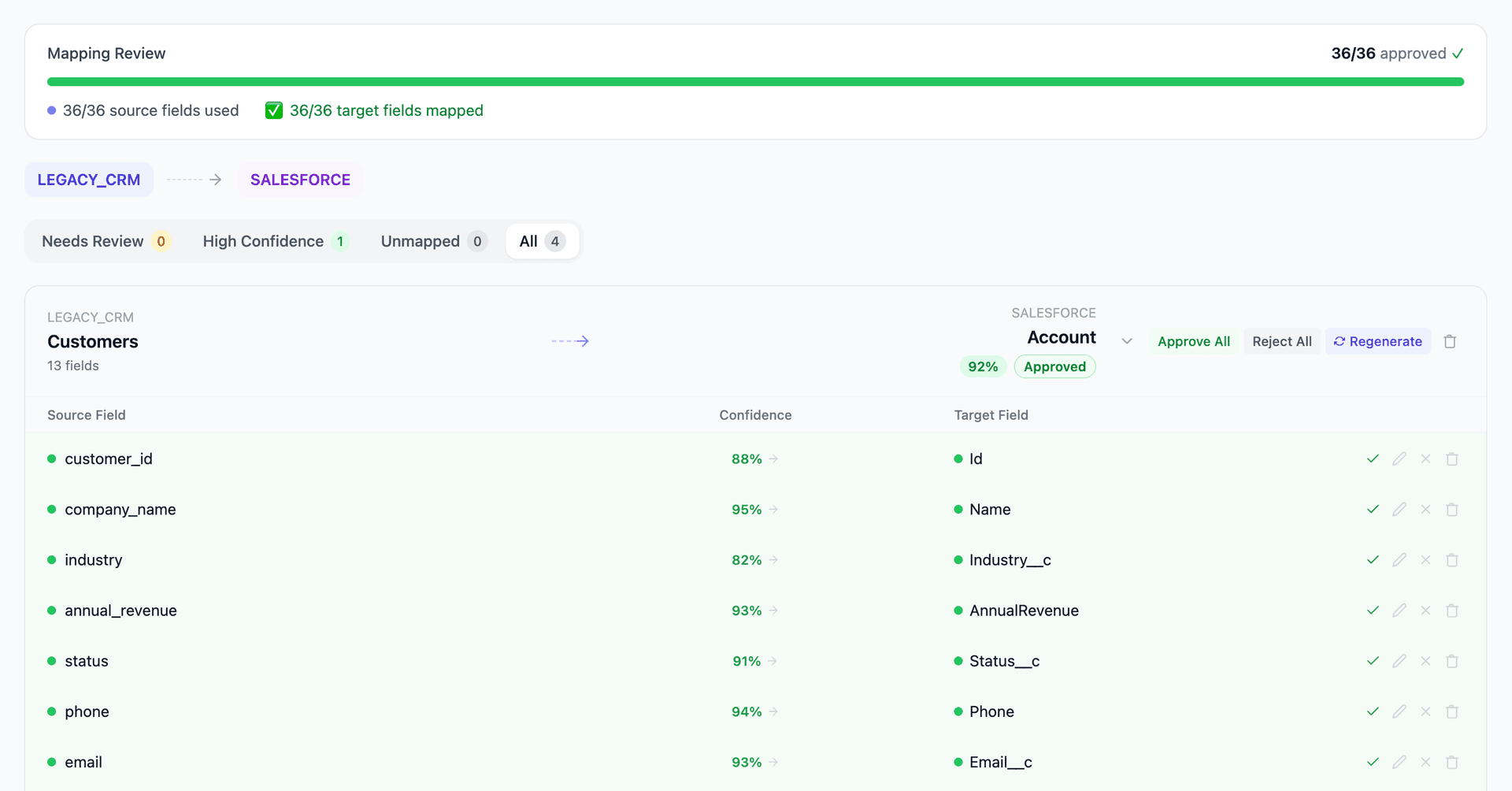
Get your Microsoft Dynamics GP to Microsoft Dynamics 365 mapping analysis — see results in under an hour
Migration timeline: manual vs. Mine
Traditional approach
Timeline
6–12 months
Estimated cost
$300K–1.5M
Team size
4–8 consultants
Typically requires
×Manual field mapping in spreadsheets
×Custom ABAP/SQL extraction scripts
×3–5 mock migration cycles
×Dedicated source system consultants
×Manual reconciliation testing
With Mine
Enterprise benchmarksTimeline
4–8 weeks
Team size
1–2 internal resources
Estimated cost
40–50% less
Included
✓Schema profiling & analysis
✓AI-generated field mappings
✓Transformation SQL
✓Validation & readiness reports
✓Production-ready load files
Common challenges migrating from Microsoft Dynamics GP to Microsoft Dynamics 365
GP's cryptic table naming to D365 entities
Dynamics GP uses non-descriptive table names inherited from its Dexterity origins — RM00101 (Customer Master), PM00200 (Vendor Master), GL00100 (Account Master), SOP10100 (Sales Transaction Work). Dynamics 365 uses descriptive entity names. Mapping between the two requires a crosswalk that covers hundreds of tables, and GP's documentation is notoriously sparse.
Explore related migrations →Choosing the right D365 target: F&O vs. Business Central
Companies must decide between Dynamics 365 Finance & Operations (enterprise-grade, X++ data model) and Business Central (mid-market, AL-based extensions). The data migration path differs significantly for each. Mine helps by profiling your GP data complexity to recommend the appropriate target and generating mappings specific to that platform.
Explore related migrations →Historical transaction migration and sub-ledger detail
GP stores financial history across work, open, and history tables (GL20000 for open year, GL30000 for history). Dynamics 365 uses different period-close and fiscal calendar models. Deciding how much history to migrate — and ensuring sub-ledger to GL reconciliation survives the transition — is a major decision point.
Explore related migrations →GP customizations and third-party ISV data
Most GP installations include third-party ISV modules (Mekorma for payments, Binary Stream for multi-entity, SalesPad for order management) that store data in custom tables alongside GP's core schema. These tables have no D365 equivalent and require individual analysis to determine what migrates, what gets archived, and what gets rebuilt.
Explore related migrations →Microsoft Dynamics GP to Microsoft Dynamics 365 field mapping — what data moves
11 data objects typically migrated
| Source Object | → | Target Object |
|---|---|---|
| RM00101 (Customer Master) | → | Customer Entity / Account |
| PM00200 (Vendor Master) | → | Vendor Entity |
| GL00100 (Account Master) | → | Chart of Accounts / Main Account |
| GL20000/GL30000 (GL Transactions) | → | General Journal |
| SOP10100/SOP30200 (Sales Orders) | → | Sales Order / Sales Invoice |
| POP10100/POP30100 (Purchase Orders) | → | Purchase Order |
| RM20101 (AR Open) | → | Customer Ledger Entry |
| PM20000 (AP Open) | → | Vendor Ledger Entry |
| IV00101/IV00102 (Item Master) | → | Item / Released Product |
| UPR00100 (Employee Master) | → | Employee / Worker |
| SY01200 (Addresses) | → | Party Addresses |
Typical enterprise migrations include 500K–10M+ records across these objects. Mine handles profiling and mapping at any scale.
The cost of manual Microsoft Dynamics GP to Microsoft Dynamics 365 migration
Microsoft offers migration toolkits and ISV solutions (like eOne SmartConnect or Binary Stream), but these handle only standard modules. Companies with customized GP installations — which is virtually all of them — still face significant manual mapping, especially for modified reports, custom Dexterity tables, and third-party ISV data.
Frequently asked questions
Related migration paths
In one enterprise migration, a single field mapping error in customer master data caused $100K in billing discrepancies that went undetected for 6 months.
Mine catches these issues before they reach production.
Built by a team that led SAP, Oracle, and Salesforce data migration programs for Fortune 500 companies at a Big 4 consulting firm. Currently in design partnership with enterprise clients running active migration programs.
Ready to migrate from Microsoft Dynamics GP to Microsoft Dynamics 365?
Tell us about your migration and we'll show you how Mine can help.
No commitment required. We'll review your migration scope and share a preliminary assessment within 48 hours.
You'll receive a preliminary mapping analysis showing how your source objects map to your target schema, with confidence scores and flagged risk areas.