
QuickBooks Enterprise to Dynamics 365 Data Migration
Outgrowing QuickBooks? Mine automates the schema translation between QuickBooks' flat structure and Dynamics 365 Business Central's dimensional accounting model — including chart of accounts restructuring and transaction type mapping.
Working with enterprise teams on active migration programs
2–3 weeks
to production-ready mappings
40–50%
cost reduction vs. manual migration
90%+
average mapping confidence
Most enterprise migrations start 6+ months behind schedule. Yours doesn't have to.
This guide is for VPs of IT, data architects, and migration leads at companies moving data from QuickBooks Enterprise to Microsoft Dynamics 365 — whether you're scoping, planning, or mid-program.
QuickBooks Enterprise and Microsoft Dynamics 365 use fundamentally different data architectures. Mine bridges this structural gap automatically — handling schema profiling, field mapping, data transformation, and validation that typically consumes months of manual effort.
Based on enterprise migration programs led by Mine's founding team
Last updated March 2026
How Mine automates your QuickBooks Enterprise to Microsoft Dynamics 365 migration
Mine analyzes your QuickBooks chart of accounts and proposes the Business Central dimensional decomposition — splitting embedded segments into G/L accounts, dimensions, and dimension values based on naming pattern recognition.
Multiple QuickBooks extraction formats (IIF, QODBC, CSV) are supported. Mine profiles whichever format you provide and flags data fidelity differences compared to the full QuickBooks schema.
Posting group assignments are generated automatically based on your transaction patterns — Mine analyzes which GL accounts QuickBooks transactions typically post to and proposes the equivalent Business Central posting group configuration.
Mine validates trial balance reconciliation after migration — ensuring the opening balances in Business Central match QuickBooks as of cutover date.
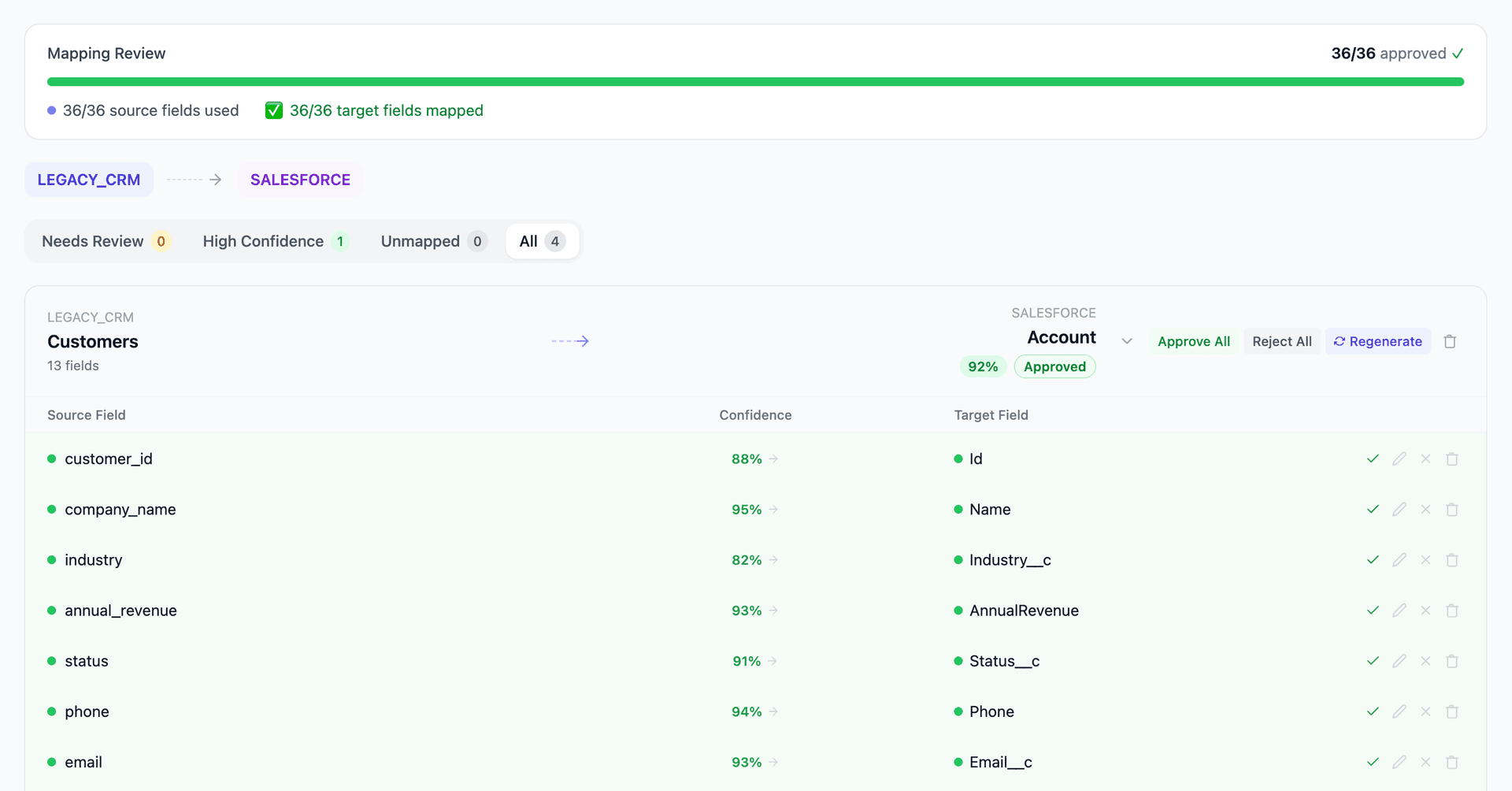
Get your QuickBooks Enterprise to Microsoft Dynamics 365 mapping analysis — see results in under an hour
Migration timeline: manual vs. Mine
Traditional approach
Timeline
2–4 months
Estimated cost
$50K–200K
Team size
1–3 consultants
Typically requires
×Manual field mapping in spreadsheets
×Custom ABAP/SQL extraction scripts
×3–5 mock migration cycles
×Dedicated source system consultants
×Manual reconciliation testing
With Mine
Enterprise benchmarksTimeline
2–3 weeks
Team size
1 internal resource
Estimated cost
40–50% less
Included
✓Schema profiling & analysis
✓AI-generated field mappings
✓Transformation SQL
✓Validation & readiness reports
✓Production-ready load files
Common challenges migrating from QuickBooks Enterprise to Microsoft Dynamics 365
Flat chart of accounts to dimensional Business Central
QuickBooks uses a flat, single-segment chart of accounts where departments and projects are embedded in account names. Business Central uses a multi-dimensional structure with G/L accounts, dimensions (department, project, cost center), and dimension values. Decomposing QuickBooks' embedded segments into proper Business Central dimensions requires pattern analysis.
Explore related migrations →QuickBooks data extraction limitations
QuickBooks Enterprise doesn't expose a clean relational database. Data access via IIF export loses some fields, QODBC is slow with query limitations, and direct QBW access requires the QuickBooks SDK. Each extraction method produces different data fidelity — Mine handles whichever format you can provide.
Explore related migrations →Posting group configuration
Business Central uses posting groups (customer, vendor, inventory, general) to control GL account assignment on transactions. QuickBooks has no equivalent — accounts are assigned directly on transactions. Setting up posting groups and ensuring historical data maps correctly to the new posting logic requires careful analysis.
Explore related migrations →Number series and document numbering
QuickBooks uses simple sequential numbering per transaction type. Business Central uses configurable number series with prefixes, suffixes, and gaps. Migrated documents must preserve their original numbers while Business Central's series starts from the correct next value.
Explore related migrations →QuickBooks Enterprise to Microsoft Dynamics 365 field mapping — what data moves
11 data objects typically migrated
| Source Object | → | Target Object |
|---|---|---|
| Customer | → | Customer |
| Vendor | → | Vendor |
| Chart of Accounts | → | G/L Account + Dimensions |
| Item | → | Item |
| Invoice | → | Sales Invoice |
| Sales Receipt | → | Cash Receipt Journal |
| Bill | → | Purchase Invoice |
| Check / Bill Payment | → | Payment Journal |
| Purchase Order | → | Purchase Order |
| Journal Entry | → | General Journal |
| Employee | → | Employee |
Typical enterprise migrations include 500K–10M+ records across these objects. Mine handles profiling and mapping at any scale.
The cost of manual QuickBooks Enterprise to Microsoft Dynamics 365 migration
Companies typically manage this migration during their Business Central implementation, using a combination of RapidStart Services and manual CSV imports. The chart of accounts restructuring and transaction mapping work is largely manual.
Frequently asked questions
Related migration paths
In one enterprise migration, a single field mapping error in customer master data caused $100K in billing discrepancies that went undetected for 6 months.
Mine catches these issues before they reach production.
Built by a team that led SAP, Oracle, and Salesforce data migration programs for Fortune 500 companies at a Big 4 consulting firm. Currently in design partnership with enterprise clients running active migration programs.
Ready to migrate from QuickBooks Enterprise to Microsoft Dynamics 365?
Tell us about your migration and we'll show you how Mine can help.
No commitment required. We'll review your migration scope and share a preliminary assessment within 48 hours.
You'll receive a preliminary mapping analysis showing how your source objects map to your target schema, with confidence scores and flagged risk areas.