
Mailchimp to Salesforce Data Migration
Upgrading to Salesforce's marketing platform? Mine automates the mapping between Mailchimp's audience model and Salesforce Marketing Cloud or Account Engagement (Pardot) — preserving subscriber data, segments, campaign history, and engagement metrics.
Working with enterprise teams on active migration programs
1–3 weeks
to production-ready mappings
40–50%
cost reduction vs. manual migration
90%+
average mapping confidence
Most enterprise migrations start 6+ months behind schedule. Yours doesn't have to.
This guide is for VPs of IT, data architects, and migration leads at companies moving data from Mailchimp to Salesforce — whether you're scoping, planning, or mid-program.
Mailchimp stores marketing data in audiences with subscriber profiles, merge fields, tags, segments, and campaign performance metrics. Salesforce Marketing Cloud uses contacts, data extensions, journeys, and email sends, while Account Engagement (Pardot) uses prospects, lists, and engagement studio programs. Mine maps Mailchimp's audience-centric model to your chosen Salesforce marketing platform automatically.
Based on enterprise migration programs led by Mine's founding team
Last updated March 2026
How Mine automates your Mailchimp to Salesforce migration
Mine routes Mailchimp subscribers to the correct Salesforce object — deduplicating against existing Leads and Contacts by email, creating new records only for subscribers not already in Salesforce, and assigning lifecycle status based on engagement history.
Tags and segments are analyzed and mapped to Salesforce equivalents — newsletter tags become campaign membership, product interest tags become custom field values, and behavioral segments become dynamic list criteria documented for rebuild.
Campaign engagement data (opens, clicks, bounces per subscriber) is preserved as custom field values or data extension records — giving the marketing team historical performance data in Salesforce from day one.
Mine documents every Mailchimp automation workflow's trigger, timing, and field references — generating a rebuild specification for Salesforce Journey Builder or Engagement Studio.
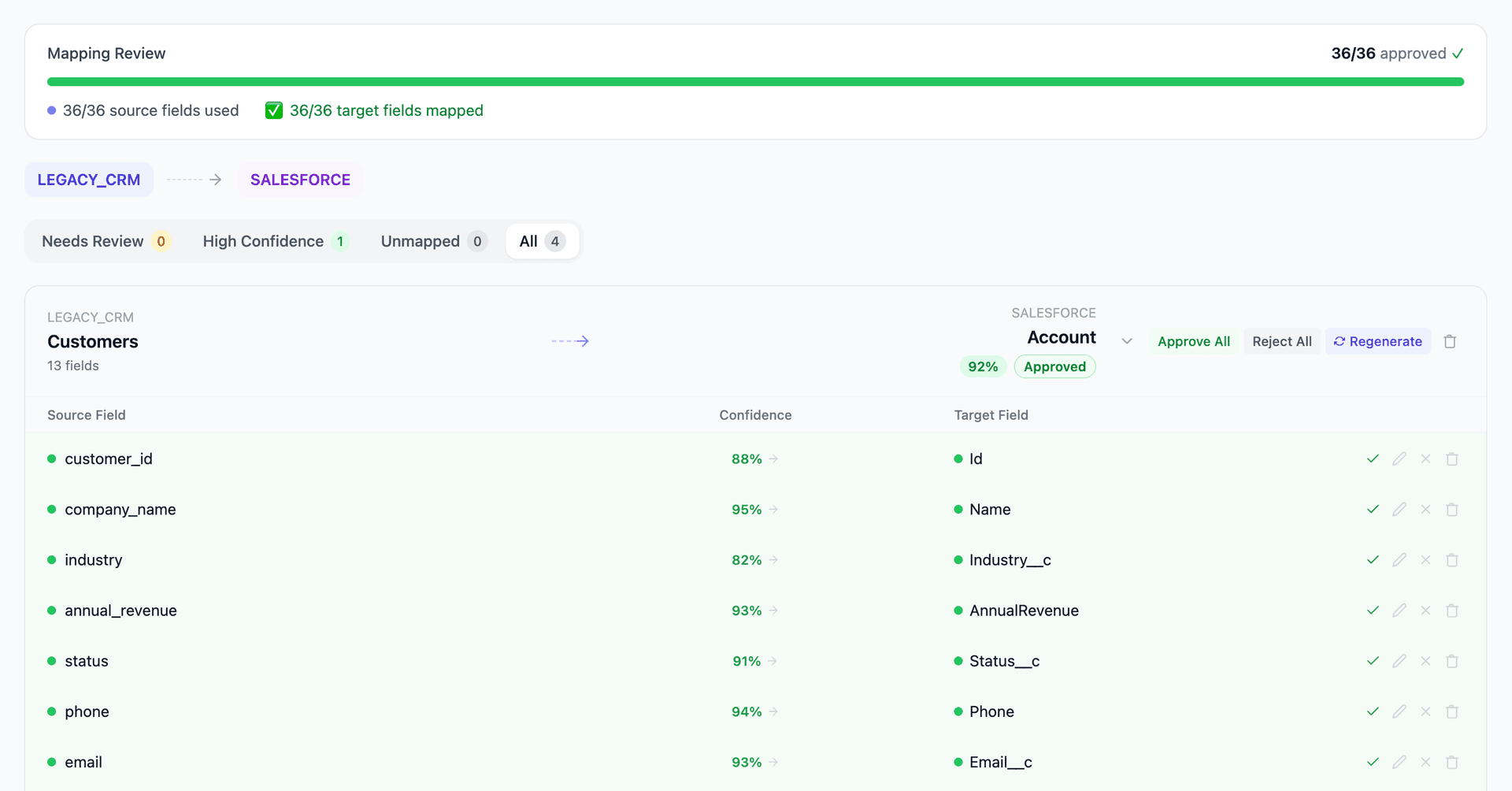
Get your Mailchimp to Salesforce mapping analysis — see results in under an hour
Migration timeline: manual vs. Mine
Traditional approach
Timeline
1–3 months
Estimated cost
$30K–150K
Team size
1–3 consultants
Typically requires
×Manual field mapping in spreadsheets
×Custom ABAP/SQL extraction scripts
×3–5 mock migration cycles
×Dedicated source system consultants
×Manual reconciliation testing
With Mine
Enterprise benchmarksTimeline
1–3 weeks
Team size
1 internal resource
Estimated cost
40–50% less
Included
✓Schema profiling & analysis
✓AI-generated field mappings
✓Transformation SQL
✓Validation & readiness reports
✓Production-ready load files
Common challenges migrating from Mailchimp to Salesforce
Subscriber routing to Salesforce object model
Mailchimp subscribers are simple records with email, merge fields, and tags. In Salesforce, each subscriber must become a Lead, Contact, or Marketing Cloud contact depending on your CRM strategy. Subscribers already in Salesforce as Leads or Contacts need deduplication, not creation. Mine routes subscribers based on email matching against existing Salesforce data and assigns lifecycle status.
Explore related migrations →Tag and segment to list/data extension translation
Mailchimp uses tags and segments for audience organization. Salesforce Marketing Cloud uses data extensions and filters. Account Engagement uses lists and dynamic lists. The segmentation model translation requires analyzing how each Mailchimp tag and segment is actually used (newsletter vs. product interest vs. lifecycle stage) and mapping to the correct Salesforce equivalent.
Explore related migrations →Campaign performance data preservation
Mailchimp tracks campaign sends, opens, clicks, bounces, and unsubscribes with per-subscriber engagement data. Salesforce Marketing Cloud and Account Engagement track engagement differently. Preserving historical campaign metrics for reporting continuity requires mapping Mailchimp's engagement data to custom fields or data extensions in Salesforce.
Explore related migrations →Automation workflow rebuild
Mailchimp's automation workflows (welcome series, abandoned cart, re-engagement) must be rebuilt in Salesforce's Journey Builder or Engagement Studio. The workflows don't migrate — they need redesign. Mine documents each Mailchimp automation's trigger conditions, wait steps, and field references for the Salesforce rebuild.
Explore related migrations →Mailchimp to Salesforce field mapping — what data moves
10 data objects typically migrated
| Source Object | → | Target Object |
|---|---|---|
| Subscriber | → | Lead / Contact / MC Contact |
| Audience | → | List / Data Extension |
| Merge Fields | → | Custom Fields / Properties |
| Tags | → | List membership / Segmentation |
| Segments | → | Dynamic List / Filter |
| Campaign (email) | → | Email Send / Campaign |
| Engagement Data (opens/clicks) | → | Custom fields / Engagement log |
| Unsubscribes / Bounces | → | Opt-out status / Bounce flags |
| Template | → | Email Template (rebuild) |
| Automation | → | Journey / Engagement Program (rebuild) |
Typical enterprise migrations include 500K–10M+ records across these objects. Mine handles profiling and mapping at any scale.
The cost of manual Mailchimp to Salesforce migration
Companies typically use CSV exports from Mailchimp and Salesforce's import tools. The subscriber deduplication against existing Salesforce contacts and engagement data preservation are the most manual parts.
Frequently asked questions
Related migration paths
In one enterprise migration, a single field mapping error in customer master data caused $100K in billing discrepancies that went undetected for 6 months.
Mine catches these issues before they reach production.
Built by a team that led SAP, Oracle, and Salesforce data migration programs for Fortune 500 companies at a Big 4 consulting firm. Currently in design partnership with enterprise clients running active migration programs.
Ready to migrate from Mailchimp to Salesforce?
Tell us about your migration and we'll show you how Mine can help.
No commitment required. We'll review your migration scope and share a preliminary assessment within 48 hours.
You'll receive a preliminary mapping analysis showing how your source objects map to your target schema, with confidence scores and flagged risk areas.