
Dynamics NAV to NetSuite Data Migration
Leaving the Microsoft ecosystem? Mine automates the mapping between Dynamics NAV's C/AL table architecture and NetSuite's cloud-native data model — preserving customer records, item masters, ledger history, and custom table data.
Working with enterprise teams on active migration programs
3–7 weeks
to production-ready mappings
40–50%
cost reduction vs. manual migration
90%+
average mapping confidence
Most enterprise migrations start 6+ months behind schedule. Yours doesn't have to.
This guide is for VPs of IT, data architects, and migration leads at companies moving data from Dynamics NAV to Oracle NetSuite — whether you're scoping, planning, or mid-program.
Dynamics NAV stores data in C/AL tables — Table 18 (Customer), Table 27 (Item), Table 17 (G/L Entry), Table 36/37 (Sales Header/Line) — with custom tables in the 50000–99999 range and ISV add-on data. NetSuite uses a cloud-native object model with Customers, Items, Journal Entries, and Sales Orders. Mine translates NAV's C/AL table schema to NetSuite's object hierarchy automatically, including custom tables and ISV data.
Based on enterprise migration programs led by Mine's founding team
Last updated March 2026
How Mine automates your Dynamics NAV to Oracle NetSuite migration
Mine profiles NAV's entire SQL database — base tables, custom tables (50000–99999 range), and ISV add-on tables — and maps each to the corresponding NetSuite object with field-level type translation and data validation rules.
NAV's dimension model (Global Dimensions 1–2 plus Dimension Set Entry table) is mapped to NetSuite's segment structure (class, department, location), with dimension value translation applied to every historical journal entry.
Custom tables and ISV data are profiled, analyzed for active records, and converted to NetSuite custom record specifications — giving the implementation team a complete build plan for custom objects.
Mine generates the transformation logic for costing method alignment, document reference crosswalks, and ledger entry date filtering — ensuring financial data migrates with proper valuation and audit trail.
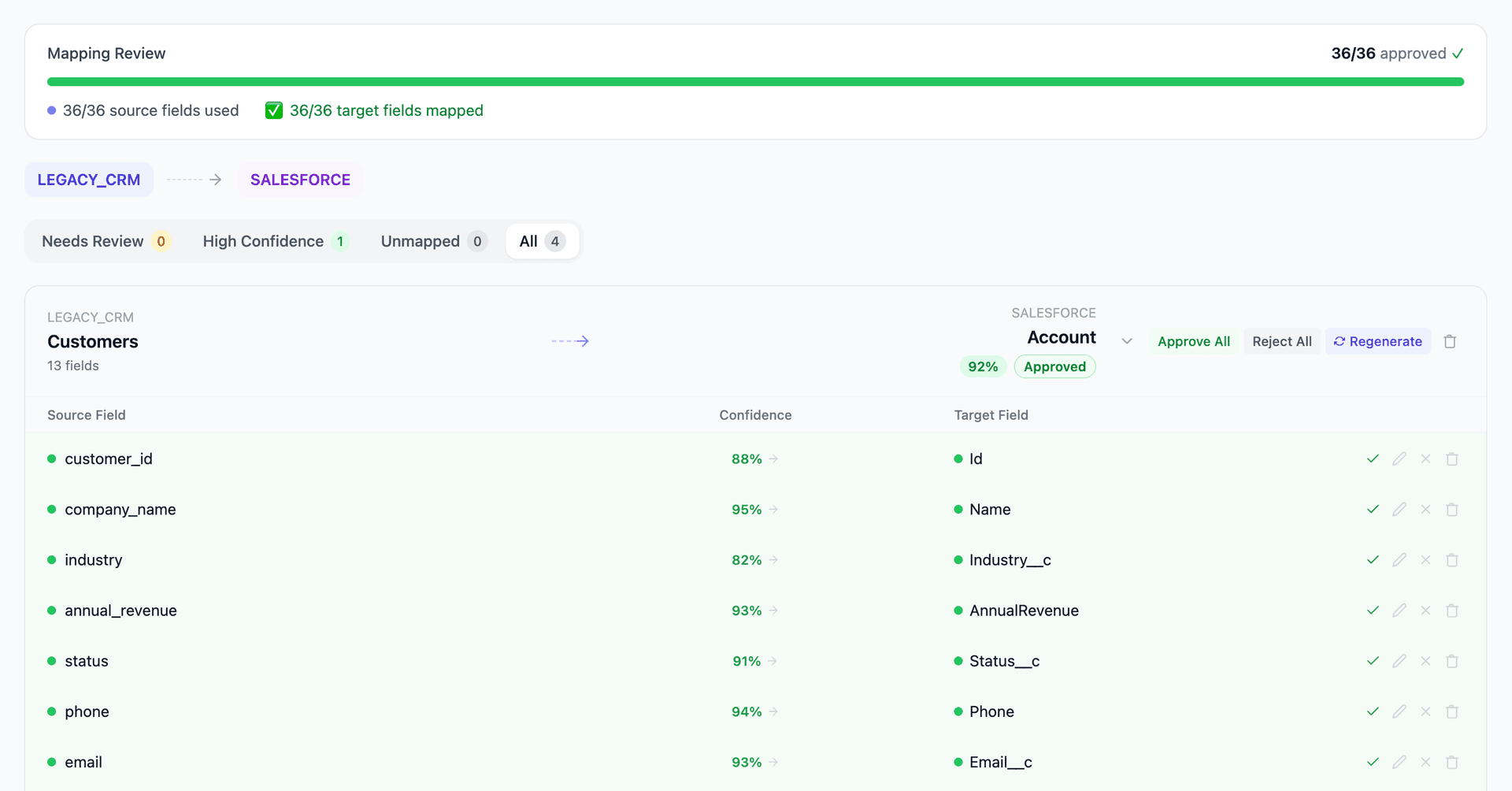
Get your Dynamics NAV to Oracle NetSuite mapping analysis — see results in under an hour
Migration timeline: manual vs. Mine
Traditional approach
Timeline
4–10 months
Estimated cost
$150K–700K
Team size
3–8 consultants
Typically requires
×Manual field mapping in spreadsheets
×Custom ABAP/SQL extraction scripts
×3–5 mock migration cycles
×Dedicated source system consultants
×Manual reconciliation testing
With Mine
Enterprise benchmarksTimeline
3–7 weeks
Team size
1–3 internal resources
Estimated cost
40–50% less
Included
✓Schema profiling & analysis
✓AI-generated field mappings
✓Transformation SQL
✓Validation & readiness reports
✓Production-ready load files
Common challenges migrating from Dynamics NAV to Oracle NetSuite
C/AL table model to NetSuite object model
NAV's numbered table system (Table 18 for Customer, Table 27 for Item, Table 17 for G/L Entry) has a fundamentally different structure than NetSuite's named objects. Field types, relationships, and data validation rules differ across both systems. NAV uses Option fields and FlowFields that have no direct NetSuite equivalent. Mine maps each NAV table to the corresponding NetSuite object with field-level type translation.
Explore related migrations →Custom tables and ISV add-on extraction
NAV databases contain custom tables in the 50000–99999 range plus ISV add-on tables. This data has no predefined mapping in NetSuite — custom records or custom fields must be created. Mine profiles all custom tables, identifies which contain active data, and generates the NetSuite custom record/field specifications for the implementation team.
Explore related migrations →Dimension model to NetSuite segments
NAV uses Global Dimensions 1–2 on transaction tables plus a Dimension Set Entry table (Table 480) for additional dimensions. NetSuite uses classes, departments, and locations as standard segments. The dimension-to-segment mapping affects every financial transaction and must be defined before any journal entries can migrate. Mine maps NAV dimensions to NetSuite segments and validates dimension set integrity.
Explore related migrations →Number series and document cross-references
NAV uses number series for all document types. NetSuite uses auto-generated document numbers with a different format. Cross-references between posted invoices and their original orders must be preserved for audit trail purposes. Mine generates the document reference crosswalk and maps NAV number series to NetSuite document numbers.
Explore related migrations →Costing method alignment
NAV supports Standard, Average, FIFO, LIFO, and Specific costing methods at the item level. NetSuite supports Average, FIFO, LIFO, Standard, and Lot-level costing but applies them differently. The costing method translation affects inventory valuation and COGS calculations post-migration. Mine validates costing method alignment and flags items where the method translation impacts valuation.
Explore related migrations →Dynamics NAV to Oracle NetSuite field mapping — what data moves
12 data objects typically migrated
| Source Object | → | Target Object |
|---|---|---|
| Table 18 (Customer) | → | Customer |
| Table 23 (Vendor) | → | Vendor |
| Table 27 (Item) | → | Item |
| Table 17 (G/L Entry) | → | Journal Entry |
| Table 21 (Cust. Ledger Entry) | → | Invoice / Customer Payment |
| Table 25 (Vendor Ledger Entry) | → | Vendor Bill / Vendor Payment |
| Table 32 (Item Ledger Entry) | → | Inventory Detail |
| Table 36/37 (Sales Header/Line) | → | Sales Order |
| Table 38/39 (Purchase Header/Line) | → | Purchase Order |
| Table 480 (Dimension Set Entry) | → | Class / Department / Location |
| Table 5050 (Contact) | → | Contact |
| Custom Tables (50000–99999) | → | Custom Records / Custom Fields |
Typical enterprise migrations include 500K–10M+ records across these objects. Mine handles profiling and mapping at any scale.
The cost of manual Dynamics NAV to Oracle NetSuite migration
These migrations are typically run by NetSuite implementation partners (with NAV extraction support) over 4–10 months. The data conversion workstream — extracting from NAV's SQL database, mapping C/AL tables to NetSuite objects, restructuring dimensions to NetSuite segments, and migrating financial history — represents the most technically demanding phase.
Frequently asked questions
Related migration paths
In one enterprise migration, a single field mapping error in customer master data caused $100K in billing discrepancies that went undetected for 6 months.
Mine catches these issues before they reach production.
Built by a team that led SAP, Oracle, and Salesforce data migration programs for Fortune 500 companies at a Big 4 consulting firm. Currently in design partnership with enterprise clients running active migration programs.
Ready to migrate from Dynamics NAV to Oracle NetSuite?
Tell us about your migration and we'll show you how Mine can help.
No commitment required. We'll review your migration scope and share a preliminary assessment within 48 hours.
You'll receive a preliminary mapping analysis showing how your source objects map to your target schema, with confidence scores and flagged risk areas.