
Dynamics 365 to NetSuite Data Migration
Moving from Dynamics 365 to NetSuite? Mine automates the schema translation between D365's legal entity model and NetSuite's subsidiary structure — including financial dimensions, transaction types, and custom entities.
Working with enterprise teams on active migration programs
4–8 weeks
to production-ready mappings
40–50%
cost reduction vs. manual migration
90%+
average mapping confidence
Most enterprise migrations start 6+ months behind schedule. Yours doesn't have to.
This guide is for VPs of IT, data architects, and migration leads at companies moving data from Microsoft Dynamics 365 to NetSuite — whether you're scoping, planning, or mid-program.
Microsoft Dynamics 365 and NetSuite use fundamentally different data architectures. Mine bridges this structural gap automatically — handling schema profiling, field mapping, data transformation, and validation that typically consumes months of manual effort.
Based on enterprise migration programs led by Mine's founding team
Last updated March 2026
How Mine automates your Microsoft Dynamics 365 to NetSuite migration
Mine maps D365 legal entities to NetSuite subsidiaries — analyzing cross-company data sharing patterns to determine which records should be shared vs. subsidiary-specific in NetSuite.
Financial dimensions are profiled and consolidated into NetSuite's classification structure — department, class, location, and custom segments — with combination validation against NetSuite's segment rules.
D365 data entity exports are automatically restructured into NetSuite's import format — handling column mapping, date format conversion, and lookup value translation per record type.
Mine validates GL mapping continuity — ensuring that D365 posting profile logic is documented so NetSuite GL impact settings can be configured to produce equivalent accounting entries.
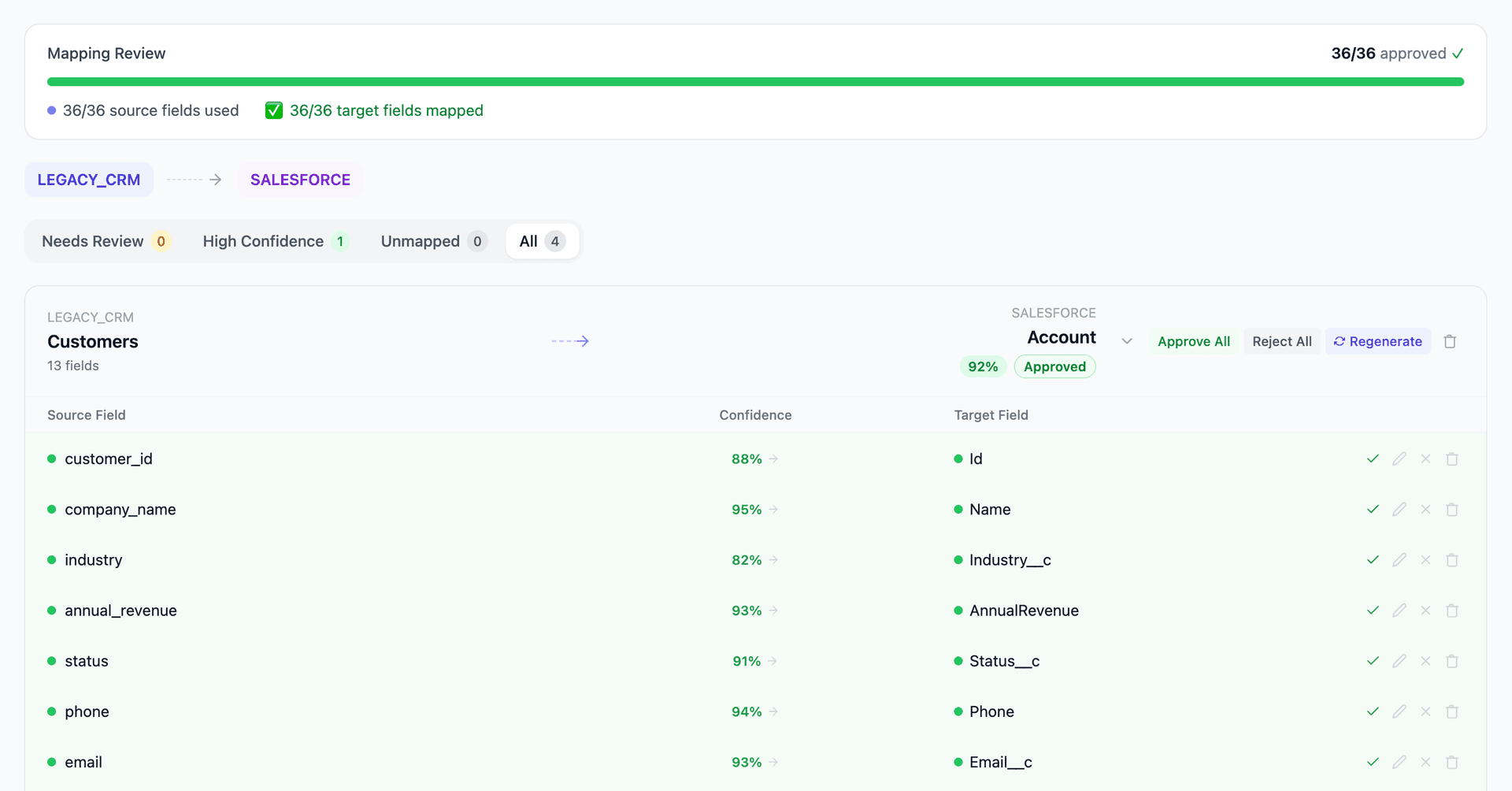
Get your Microsoft Dynamics 365 to NetSuite mapping analysis — see results in under an hour
Migration timeline: manual vs. Mine
Traditional approach
Timeline
6–10 months
Estimated cost
$400K–1.5M
Team size
4–8 consultants
Typically requires
×Manual field mapping in spreadsheets
×Custom ABAP/SQL extraction scripts
×3–5 mock migration cycles
×Dedicated source system consultants
×Manual reconciliation testing
With Mine
Enterprise benchmarksTimeline
4–8 weeks
Team size
2–3 internal resources
Estimated cost
40–50% less
Included
✓Schema profiling & analysis
✓AI-generated field mappings
✓Transformation SQL
✓Validation & readiness reports
✓Production-ready load files
Common challenges migrating from Microsoft Dynamics 365 to NetSuite
D365 legal entities to NetSuite subsidiaries
D365 F&O partitions transactional data by legal entity with cross-company data sharing configured at the table level. NetSuite's OneWorld uses a subsidiary hierarchy where entity masters (customers, items) can be shared across subsidiaries. The structural inversion — D365 partitions by default while NetSuite shares by default — requires careful analysis of which records need subsidiary-level segmentation.
Explore related migrations →Financial dimensions to NetSuite classifications
D365 supports unlimited financial dimensions with complex combination rules and default dimension templates. NetSuite uses a fixed set of classifications (subsidiary, department, class, location) plus custom segments. Mapping D365's flexible dimension model to NetSuite's structured classification system may require consolidating multiple D365 dimensions into fewer NetSuite fields.
Explore related migrations →Data entity export to NetSuite import alignment
D365's data entities aggregate multiple tables into flattened export structures. NetSuite's CSV import expects data organized by record type with specific column patterns. The structural mismatch means D365 data entity exports can't be imported directly into NetSuite — transformation and restructuring is required for every object.
Explore related migrations →Posting profiles and GL integration differences
D365 uses posting profiles to control which GL accounts receive debits and credits for each transaction type. NetSuite uses GL impact settings and custom GL mapping rules. The GL integration logic must be rebuilt in NetSuite, and historical transactions need their GL references translated.
Explore related migrations →Microsoft Dynamics 365 to NetSuite field mapping — what data moves
11 data objects typically migrated
| Source Object | → | Target Object |
|---|---|---|
| Customer Account | → | Customer |
| Vendor Account | → | Vendor |
| Released Product | → | Item |
| Sales Order | → | Sales Order |
| Purchase Order | → | Purchase Order |
| General Journal | → | Journal Entry |
| Main Account | → | Account |
| Financial Dimensions | → | Department / Class / Location |
| Vendor Invoice | → | Vendor Bill |
| Free Text Invoice | → | Invoice |
| Worker / Employee | → | Employee |
Typical enterprise migrations include 500K–10M+ records across these objects. Mine handles profiling and mapping at any scale.
The cost of manual Microsoft Dynamics 365 to NetSuite migration
Companies typically manage this migration through their NetSuite implementation partner using CSV exports from D365 data entities. The mapping and transformation work is manual and repetitive — especially for companies with heavy D365 customization.
Frequently asked questions
Related migration paths
In one enterprise migration, a single field mapping error in customer master data caused $100K in billing discrepancies that went undetected for 6 months.
Mine catches these issues before they reach production.
Built by a team that led SAP, Oracle, and Salesforce data migration programs for Fortune 500 companies at a Big 4 consulting firm. Currently in design partnership with enterprise clients running active migration programs.
Ready to migrate from Microsoft Dynamics 365 to NetSuite?
Tell us about your migration and we'll show you how Mine can help.
No commitment required. We'll review your migration scope and share a preliminary assessment within 48 hours.
You'll receive a preliminary mapping analysis showing how your source objects map to your target schema, with confidence scores and flagged risk areas.