
Zendesk to Salesforce Data Migration
Consolidating support into Salesforce Service Cloud? Mine automates the mapping between Zendesk's ticket model and Salesforce's Case architecture — preserving ticket history, macros context, and customer relationships.
Working with enterprise teams on active migration programs
2–4 weeks
to production-ready mappings
40–50%
cost reduction vs. manual migration
90%+
average mapping confidence
Most enterprise migrations start 6+ months behind schedule. Yours doesn't have to.
This guide is for VPs of IT, data architects, and migration leads at companies moving data from Zendesk to Salesforce — whether you're scoping, planning, or mid-program.
Zendesk stores support data across tickets, users, organizations, and help center articles with custom fields, tags, and trigger-based automation. Salesforce Service Cloud uses Cases, Contacts, Accounts, and Knowledge Articles with a fundamentally different routing and escalation model. Mine translates Zendesk's support-native schema to Salesforce's CRM-integrated service architecture automatically.
Based on enterprise migration programs led by Mine's founding team
Last updated March 2026
How Mine automates your Zendesk to Salesforce migration
Mine maps Zendesk tickets to Salesforce Cases with requester-to-Contact and organization-to-Account resolution — including identity matching for Zendesk users who don't have exact Salesforce Contact matches.
Ticket conversation threads are preserved with public/internal visibility — Zendesk public comments become Case Comments or EmailMessages while internal notes become Chatter posts or internal-only Case Comments.
Custom fields and tags are profiled and mapped to Salesforce Case fields — with tag-to-picklist conversion rules and ticket form-to-record type mapping generated automatically.
Mine generates the complete Help Center to Knowledge migration — article content, categorization, and access permissions translated to Salesforce's Knowledge structure.
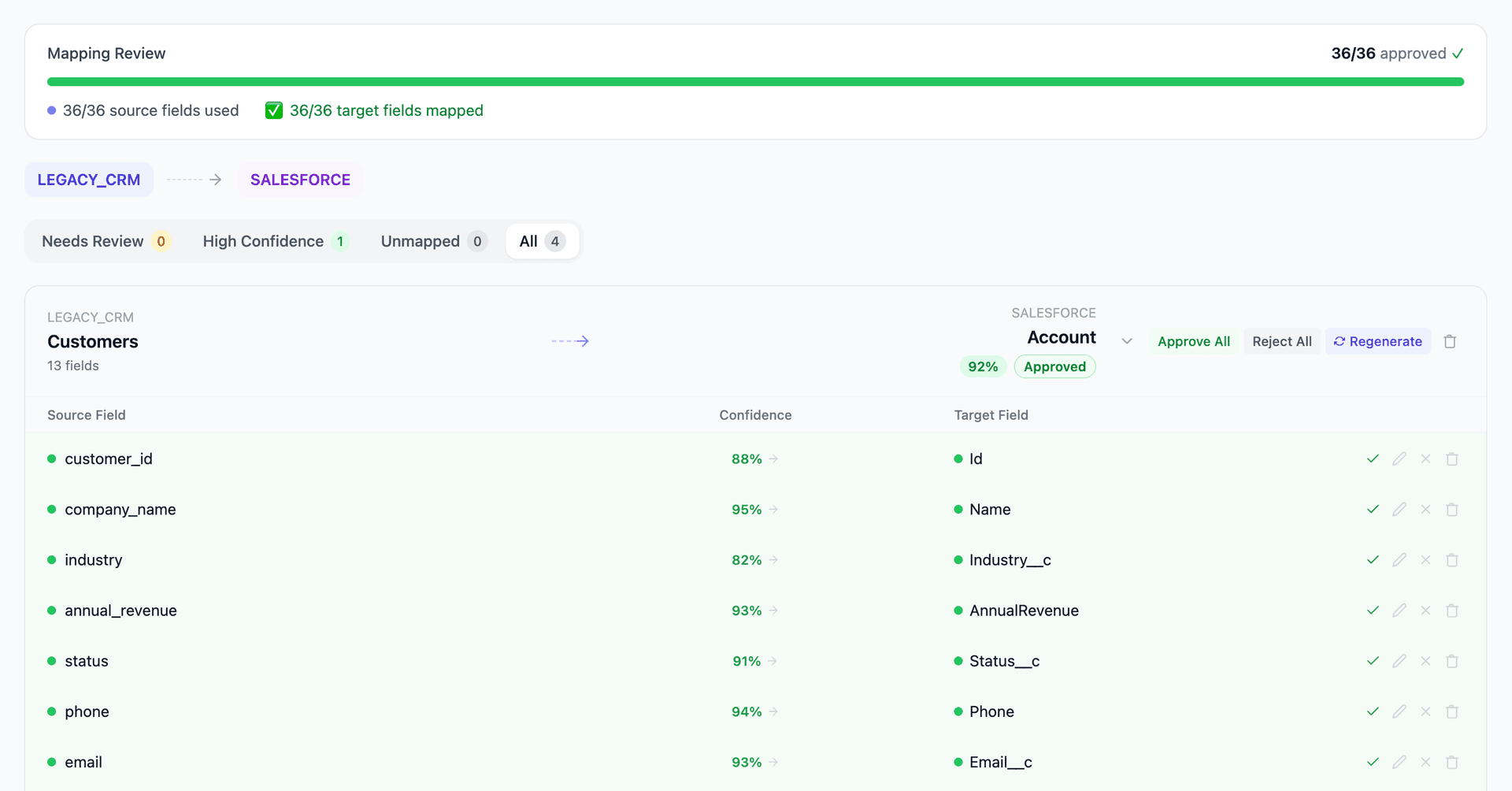
Get your Zendesk to Salesforce mapping analysis — see results in under an hour
Migration timeline: manual vs. Mine
Traditional approach
Timeline
2–4 months
Estimated cost
$100K–350K
Team size
2–4 consultants
Typically requires
×Manual field mapping in spreadsheets
×Custom ABAP/SQL extraction scripts
×3–5 mock migration cycles
×Dedicated source system consultants
×Manual reconciliation testing
With Mine
Enterprise benchmarksTimeline
2–4 weeks
Team size
1 internal resource
Estimated cost
40–50% less
Included
✓Schema profiling & analysis
✓AI-generated field mappings
✓Transformation SQL
✓Validation & readiness reports
✓Production-ready load files
Common challenges migrating from Zendesk to Salesforce
Ticket-to-Case structural translation
Zendesk tickets use a requester (end user) + assignee (agent) + group model. Salesforce Cases use Contact (who reported) + Account (which company) + Owner (agent) + Queue (team). The relationship mapping requires resolving Zendesk requesters to Salesforce Contacts and Zendesk organizations to Salesforce Accounts — which may require identity resolution and deduplication.
Explore related migrations →Ticket comment and conversation history
Zendesk stores ticket comments as a conversation thread with public and internal notes, including rich text formatting and inline images. Salesforce uses Case Comments (limited formatting) or EmailMessage records plus Chatter for internal notes. Preserving the full conversation thread with correct public/internal visibility requires careful mapping of Zendesk's comment model to Salesforce's options.
Explore related migrations →Custom fields, tags, and ticket forms
Zendesk's custom ticket fields and ticket forms (which control which fields appear) have no direct Salesforce equivalent. Tags are used extensively in Zendesk for routing and reporting but Salesforce doesn't have a native tag system. Each custom field needs a Salesforce Case field, and tags must be converted to picklist values, checkboxes, or a custom tagging solution.
Explore related migrations →Help center to Salesforce Knowledge migration
Zendesk's Help Center stores articles in sections and categories with translations and access permissions. Salesforce Knowledge uses article types, data categories, and different versioning. The content format, categorization structure, and access model all need translation.
Explore related migrations →Zendesk to Salesforce field mapping — what data moves
11 data objects typically migrated
| Source Object | → | Target Object |
|---|---|---|
| Ticket | → | Case |
| Ticket Comment | → | Case Comment / EmailMessage |
| User (end user) | → | Contact |
| User (agent) | → | User |
| Organization | → | Account |
| Group | → | Queue |
| Custom Fields | → | Case fields |
| Tags | → | Picklist / Custom |
| Help Center Article | → | Knowledge Article |
| Satisfaction Rating | → | Custom field / Survey |
| Attachment | → | ContentDocument / Files |
Typical enterprise migrations include 500K–10M+ records across these objects. Mine handles profiling and mapping at any scale.
The cost of manual Zendesk to Salesforce migration
Companies typically use CSV exports from Zendesk or the Zendesk API combined with Salesforce Data Loader. The ticket history volume (often millions of records), custom field mapping, and user-to-Contact matching make this more complex than it initially appears.
Frequently asked questions
In one enterprise migration, a single field mapping error in customer master data caused $100K in billing discrepancies that went undetected for 6 months.
Mine catches these issues before they reach production.
Built by a team that led SAP, Oracle, and Salesforce data migration programs for Fortune 500 companies at a Big 4 consulting firm. Currently in design partnership with enterprise clients running active migration programs.
Ready to migrate from Zendesk to Salesforce?
Tell us about your migration and we'll show you how Mine can help.
No commitment required. We'll review your migration scope and share a preliminary assessment within 48 hours.
You'll receive a preliminary mapping analysis showing how your source objects map to your target schema, with confidence scores and flagged risk areas.