
Relativity to iManage Data Migration
Moving documents from Relativity to iManage? Mine automates the mapping between Relativity's eDiscovery workspace model and iManage's document management architecture — preserving document metadata, coding decisions, and folder structures.
Working with enterprise teams on active migration programs
1–3 weeks
to production-ready mappings
40–50%
cost reduction vs. manual migration
90%+
average mapping confidence
Most enterprise migrations start 6+ months behind schedule. Yours doesn't have to.
This guide is for VPs of IT, data architects, and migration leads at companies moving data from Relativity to iManage — whether you're scoping, planning, or mid-program.
Relativity stores litigation documents in workspaces with fields, layouts, coding decisions, and production sets optimized for document review. iManage organizes documents in client/matter workspaces with metadata profiles, version control, and security designed for ongoing document management. Mine translates Relativity's review-centric data to iManage's management-centric model — preserving the metadata investments made during eDiscovery.
Based on enterprise migration programs led by Mine's founding team
Last updated March 2026
How Mine automates your Relativity to iManage migration
Mine translates Relativity's eDiscovery metadata to iManage's document management profile attributes — mapping responsiveness coding, privilege designations, and issue tags to iManage custom fields that preserve the review investment.
Document selection criteria are generated from Relativity coding fields — Mine identifies which documents should migrate (key, responsive, privileged, work product) vs. which should be archived or disposed based on your matter close policy.
Production Bates numbers are preserved as iManage profile attributes — so documents remain searchable by production number in the DMS for ongoing litigation reference.
Mine maps Relativity's folder structure to iManage's workspace organization and proposes restructuring where review-centric groupings should be replaced with management-centric filing.
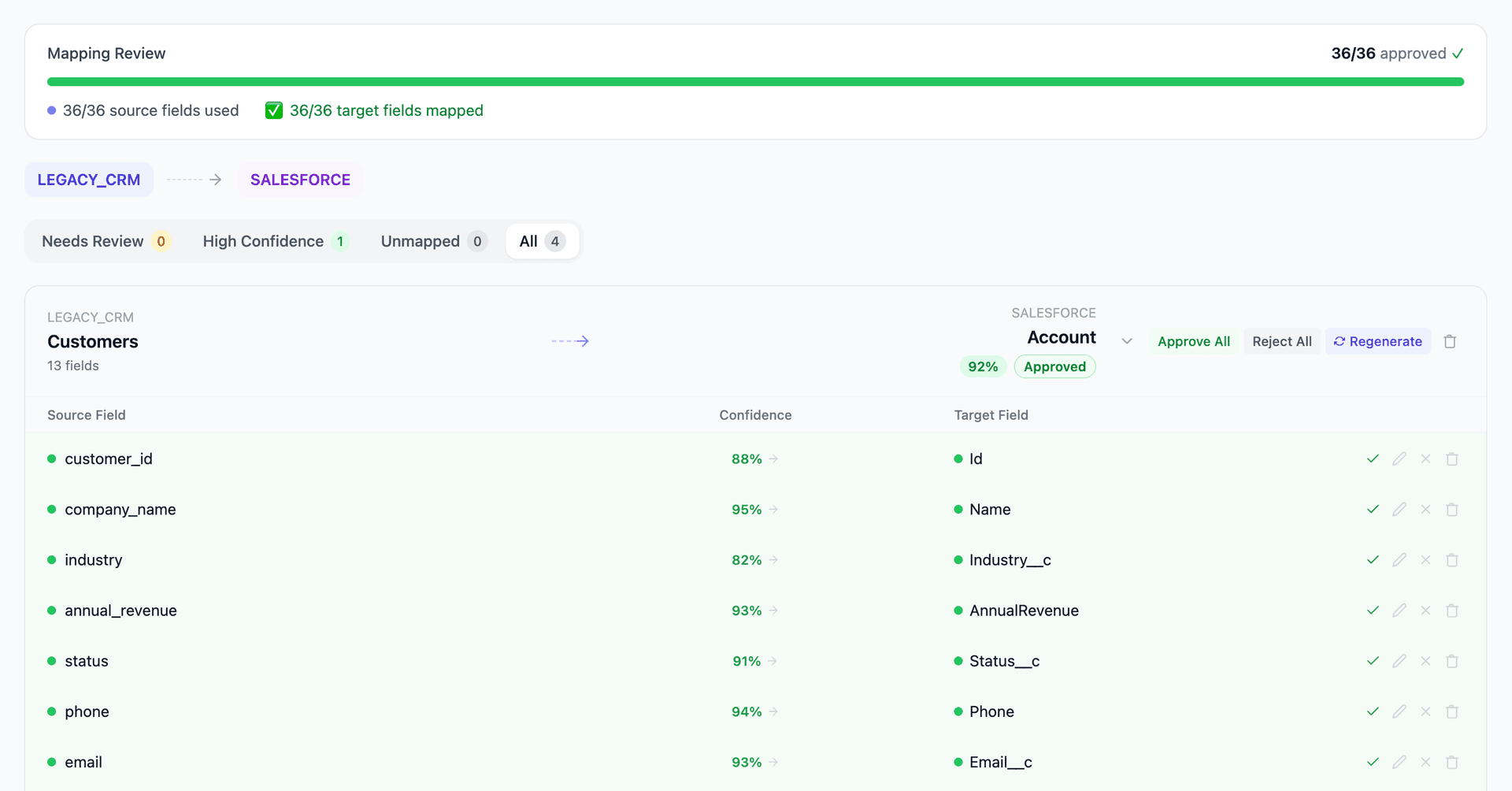
Get your Relativity to iManage mapping analysis — see results in under an hour
Migration timeline: manual vs. Mine
Traditional approach
Timeline
1–3 months
Estimated cost
$30K–150K
Team size
1–3 litigation support specialists
Typically requires
×Manual field mapping in spreadsheets
×Custom ABAP/SQL extraction scripts
×3–5 mock migration cycles
×Dedicated source system consultants
×Manual reconciliation testing
With Mine
Enterprise benchmarksTimeline
1–3 weeks
Team size
1 internal resource
Estimated cost
40–50% less
Included
✓Schema profiling & analysis
✓AI-generated field mappings
✓Transformation SQL
✓Validation & readiness reports
✓Production-ready load files
Common challenges migrating from Relativity to iManage
eDiscovery metadata to document management metadata
Relativity workspaces contain eDiscovery-specific fields — Responsiveness, Privilege, Issue Coding, Confidentiality Designation, Production Bates Numbers. iManage uses document management metadata — document type, author, practice area, security class. Mine maps Relativity's review-specific fields to iManage's management-specific profile attributes, preserving the review investment as document metadata.
Explore related migrations →Document selection and scope
Not all Relativity documents should migrate to iManage — typically only key documents (responsive, hot, privileged), work product (privilege logs, production sets, review outlines), and attorney notes move to the DMS. The rest is archived or disposed per retention policy. Mine generates selection criteria based on coding fields and tags to define the migration scope.
Explore related migrations →Production numbering and Bates stamps
Relativity tracks production numbers (Bates stamps) across multiple production sets. These identifiers are critical for ongoing litigation reference and must be preserved in iManage. Mine maps production numbers to iManage custom profile fields so documents remain findable by Bates number in the DMS.
Explore related migrations →Workspace structure to iManage filing
Relativity workspaces use folders, saved searches, and views for document organization. iManage uses workspace folders with different structural patterns. The organizational structure that made sense for review may need restructuring for long-term management. Mine maps Relativity's folder structure to iManage's workspace tabs and proposes reorganization where review-specific groupings don't serve management needs.
Explore related migrations →Relativity to iManage field mapping — what data moves
10 data objects typically migrated
| Source Object | → | Target Object |
|---|---|---|
| Workspace | → | Workspace (client/matter) |
| Document (native) | → | Document |
| Document (produced/redacted) | → | Document (production version) |
| Responsiveness Coding | → | Custom profile attribute |
| Privilege Designation | → | Security class / Custom attribute |
| Issue Coding / Tags | → | Custom profile attributes |
| Production Bates Number | → | Custom profile field |
| Folder Structure | → | Workspace folders |
| Privilege Log | → | Work product document |
| Review Notes / Comments | → | Document annotations / Notes |
Typical enterprise migrations include 500K–10M+ records across these objects. Mine handles profiling and mapping at any scale.
The cost of manual Relativity to iManage migration
Litigation support teams and legal IT consultants manage these migrations as part of matter close procedures. The metadata translation, production document selection, and security classification are the key decision points.
Frequently asked questions
Related migration paths
In one enterprise migration, a single field mapping error in customer master data caused $100K in billing discrepancies that went undetected for 6 months.
Mine catches these issues before they reach production.
Built by a team that led SAP, Oracle, and Salesforce data migration programs for Fortune 500 companies at a Big 4 consulting firm. Currently in design partnership with enterprise clients running active migration programs.
Ready to migrate from Relativity to iManage?
Tell us about your migration and we'll show you how Mine can help.
No commitment required. We'll review your migration scope and share a preliminary assessment within 48 hours.
You'll receive a preliminary mapping analysis showing how your source objects map to your target schema, with confidence scores and flagged risk areas.