
NetSuite to Salesforce Data Migration
Move your customer, opportunity, and transaction data from NetSuite to Salesforce with AI-powered automation. Mine maps NetSuite's subsidiary structure to Salesforce's flat model without losing business context.
Working with enterprise teams on active migration programs
3–6 weeks
to production-ready mappings
40–50%
cost reduction vs. manual migration
90%+
average mapping confidence
Most enterprise migrations start 6+ months behind schedule. Yours doesn't have to.
This guide is for VPs of IT, data architects, and migration leads at companies moving data from NetSuite to Salesforce — whether you're scoping, planning, or mid-program.
NetSuite organizes data by subsidiary with entity-level sharing and subsidiary-specific transactions, while Salesforce uses a flat Account-Contact-Opportunity model with no native subsidiary concept. Mine maps NetSuite's subsidiary structure to Salesforce record types or custom fields automatically, preserving customer relationships, transaction history, and custom record data.
Based on enterprise migration programs led by Mine's founding team
Last updated March 2026
How Mine automates your NetSuite to Salesforce migration
Mine profiles NetSuite's subsidiary structure and proposes Salesforce modeling strategies — whether consolidating subsidiaries into one org with record types or preserving segmentation through custom fields.
Custom record types are analyzed field-by-field. Mine detects relationship patterns, scripted dependencies, and sublist structures, then proposes equivalent Salesforce custom objects with lookup relationships.
NetSuite transaction lifecycles (estimate → SO → invoice → payment) are mapped to Salesforce Opportunity stages or custom objects with full status translation tables generated automatically.
Mine handles NetSuite's internal ID-to-Salesforce external ID mapping, ensuring referential integrity across all migrated objects.
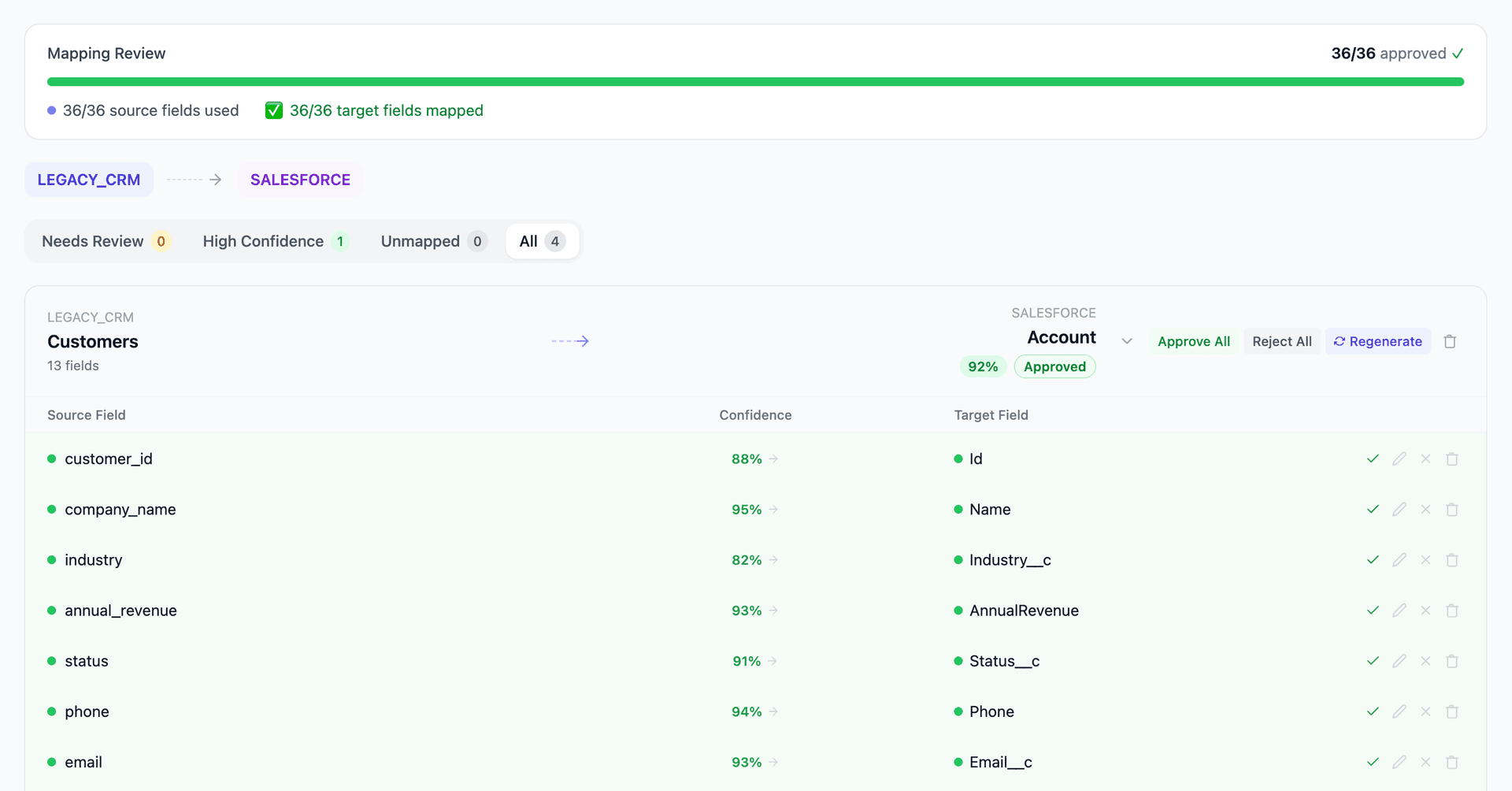
Get your NetSuite to Salesforce mapping analysis — see results in under an hour
Migration timeline: manual vs. Mine
Traditional approach
Timeline
4–8 months
Estimated cost
$300K–1M
Team size
3–6 consultants
Typically requires
×Manual field mapping in spreadsheets
×Custom ABAP/SQL extraction scripts
×3–5 mock migration cycles
×Dedicated source system consultants
×Manual reconciliation testing
With Mine
Enterprise benchmarksTimeline
3–6 weeks
Team size
1–2 internal resources
Estimated cost
40–50% less
Included
✓Schema profiling & analysis
✓AI-generated field mappings
✓Transformation SQL
✓Validation & readiness reports
✓Production-ready load files
Common challenges migrating from NetSuite to Salesforce
Subsidiary structure mapping
NetSuite's OneWorld subsidiaries segment financial and transactional data. A customer can exist at the entity level but have subsidiary-specific pricing, payment terms, and addresses. Salesforce has no native hierarchy that maps to this — requiring decisions about record types, custom fields, or multi-org architecture.
Explore related migrations →Custom record type migration
NetSuite allows unlimited custom record types with custom fields, sublists, and scripted logic. These don't map to standard Salesforce objects and often require custom object creation. Each custom record's relationships, field types, and scripted dependencies must be analyzed individually.
Explore related migrations →Transaction history and status mapping
NetSuite's transaction model (estimates → sales orders → invoices → payments) uses a different lifecycle than Salesforce's Opportunity stages. Mapping historical transaction statuses to Salesforce Opportunity stages or custom objects requires business logic decisions about what constitutes a 'won' deal vs. an open pipeline item.
Explore related migrations →Saved searches and formula fields
NetSuite formula fields use a proprietary syntax that has no Salesforce equivalent. Saved searches that drive business processes need to be rebuilt as Salesforce reports or SOQL queries. The underlying field references change entirely.
Explore related migrations →NetSuite to Salesforce field mapping — what data moves
10 data objects typically migrated
| Source Object | → | Target Object |
|---|---|---|
| Customer (Entity) | → | Account |
| Contact | → | Contact |
| Opportunity (Estimate) | → | Opportunity |
| Sales Order | → | Opportunity / Order |
| Invoice | → | Custom Object / Archive |
| Item (Inventory/Service/Non-Inventory) | → | Product2 / PricebookEntry |
| Custom Record Types | → | Custom Objects |
| Employee | → | User / Contact |
| Vendor | → | Account (Vendor type) |
| Notes / Activities | → | Task / Event / Note |
Typical enterprise migrations include 500K–10M+ records across these objects. Mine handles profiling and mapping at any scale.
The cost of manual NetSuite to Salesforce migration
Companies typically use NetSuite's SuiteTalk API or CSV exports combined with Salesforce Data Loader and extensive manual mapping. This approach works for simple migrations but breaks down when custom records, multi-subsidiary structures, and transaction history are involved.
Frequently asked questions
Related migration paths
In one enterprise migration, a single field mapping error in customer master data caused $100K in billing discrepancies that went undetected for 6 months.
Mine catches these issues before they reach production.
Built by a team that led SAP, Oracle, and Salesforce data migration programs for Fortune 500 companies at a Big 4 consulting firm. Currently in design partnership with enterprise clients running active migration programs.
Ready to migrate from NetSuite to Salesforce?
Tell us about your migration and we'll show you how Mine can help.
No commitment required. We'll review your migration scope and share a preliminary assessment within 48 hours.
You'll receive a preliminary mapping analysis showing how your source objects map to your target schema, with confidence scores and flagged risk areas.