
Legacy Database to NetSuite Data Migration
Replacing a homegrown system with NetSuite? Mine profiles any relational database and automates the mapping to NetSuite's entity model — even when there's no documentation, no ERD, and cryptic column names.
Working with enterprise teams on active migration programs
3–6 weeks
to production-ready mappings
40–50%
cost reduction vs. manual migration
90%+
average mapping confidence
Most enterprise migrations start 6+ months behind schedule. Yours doesn't have to.
This guide is for VPs of IT, data architects, and migration leads at companies moving data from Legacy Database to NetSuite — whether you're scoping, planning, or mid-program.
Legacy databases — custom SQL Server apps, Access databases, FoxPro, FileMaker — have no standard schema, undocumented relationships, and years of accumulated data quality issues. NetSuite expects clean, structured entity data. Mine bridges this gap by inferring your legacy schema from data patterns and mapping it to NetSuite's Customer, Vendor, Item, and Transaction records automatically.
Based on enterprise migration programs led by Mine's founding team
Last updated March 2026
How Mine automates your Legacy Database to NetSuite migration
Mine profiles any relational database and infers table relationships from data patterns — even when foreign keys aren't defined and documentation doesn't exist. The result is a complete data dictionary and ERD you likely don't have.
Field content analysis determines the correct NetSuite field type for each column — not based on the schema declaration but on actual data values sampled from your database.
Composite tables are detected and decomposition rules are proposed — splitting source rows into multiple NetSuite entities with correct relationships and subsidiary assignments.
Mine generates a complete data quality report before migration — duplicates, orphans, type mismatches, and encoding issues — so problems are fixed before reaching NetSuite.
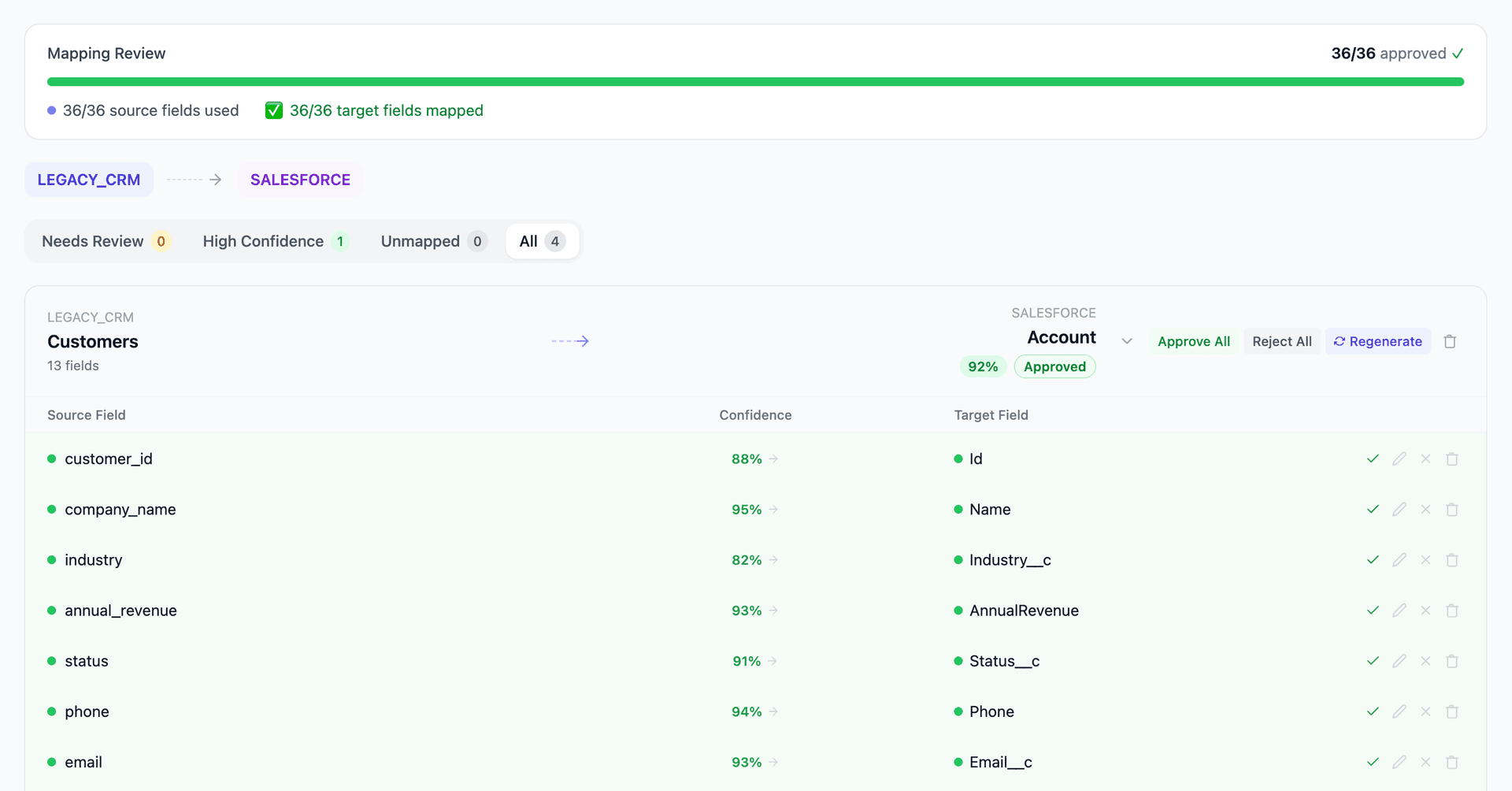
Get your Legacy Database to NetSuite mapping analysis — see results in under an hour
Migration timeline: manual vs. Mine
Traditional approach
Timeline
4–8 months
Estimated cost
$200K–800K
Team size
3–6 consultants
Typically requires
×Manual field mapping in spreadsheets
×Custom ABAP/SQL extraction scripts
×3–5 mock migration cycles
×Dedicated source system consultants
×Manual reconciliation testing
With Mine
Enterprise benchmarksTimeline
3–6 weeks
Team size
1–2 internal resources
Estimated cost
40–50% less
Included
✓Schema profiling & analysis
✓AI-generated field mappings
✓Transformation SQL
✓Validation & readiness reports
✓Production-ready load files
Common challenges migrating from Legacy Database to NetSuite
Undocumented schema discovery
Legacy databases rarely have ERD documentation or data dictionaries. Table names may be cryptic (TBL_CUST, FLD_01), relationships may not use foreign keys, and the same data may exist in multiple locations. Mine infers relationships from data patterns — matching column values across tables to discover implicit joins.
Explore related migrations →Data type inconsistencies
Legacy databases commonly store dates as strings, phone numbers as integers, currencies without decimals, and booleans as Y/N or 1/0. NetSuite expects properly typed data. Every field needs content analysis to determine the correct NetSuite field type.
Explore related migrations →Composite tables requiring decomposition
A legacy 'Customers' table might contain what NetSuite separates into Customers, Contacts, and Addresses. A 'Transactions' table might mix orders, invoices, and payments with a type column. Decomposing these composite structures into NetSuite's entity model requires business logic decisions.
Explore related migrations →No referential integrity enforcement
Legacy databases often have orphaned records, broken references, and inconsistent foreign keys. NetSuite enforces referential integrity. Data quality issues must be identified and remediated before loading into NetSuite — or the import will fail with reference errors.
Explore related migrations →Legacy Database to NetSuite field mapping — what data moves
10 data objects typically migrated
| Source Object | → | Target Object |
|---|---|---|
| Customers / Clients table | → | Customer |
| Contacts / People table | → | Contact (sub-record) |
| Products / Services table | → | Item |
| Orders / Sales table | → | Sales Order / Invoice |
| Invoices / Billing table | → | Invoice / Cash Sale |
| Vendors / Suppliers | → | Vendor |
| Chart of Accounts / GL | → | Account + Dimensions |
| Inventory table | → | Inventory Adjustment |
| Employees table | → | Employee |
| Categories / Types table | → | Custom Lists |
Typical enterprise migrations include 500K–10M+ records across these objects. Mine handles profiling and mapping at any scale.
The cost of manual Legacy Database to NetSuite migration
Companies typically hire a database developer to reverse-engineer the schema and a NetSuite consultant to build the import. This manual approach takes 4–8 months for databases with 50–200 tables.
Frequently asked questions
Related migration paths
In one enterprise migration, a single field mapping error in customer master data caused $100K in billing discrepancies that went undetected for 6 months.
Mine catches these issues before they reach production.
Built by a team that led SAP, Oracle, and Salesforce data migration programs for Fortune 500 companies at a Big 4 consulting firm. Currently in design partnership with enterprise clients running active migration programs.
Ready to migrate from Legacy Database to NetSuite?
Tell us about your migration and we'll show you how Mine can help.
No commitment required. We'll review your migration scope and share a preliminary assessment within 48 hours.
You'll receive a preliminary mapping analysis showing how your source objects map to your target schema, with confidence scores and flagged risk areas.